Authenticated is not aligned
SPF and DKIM both passed and the email was still a phish. Then 15 real emails from my own inbox showed exactly where header checks stop working.
- Date
This is the calibration story behind PhishTriage, a command-line phishing analyzer whose every score traces to a rule in a YAML file. The project page covers what it does and how it was built: I directed the design and the calibration, and Claude Code wrote most of the Python. This is about what happened when real mail went through it.
Two green checks
Here is the email the tool was built to explain. The display name says Chase. SPF passes. DKIM passes. A reader who has been told “look for the authentication results” would stop there.
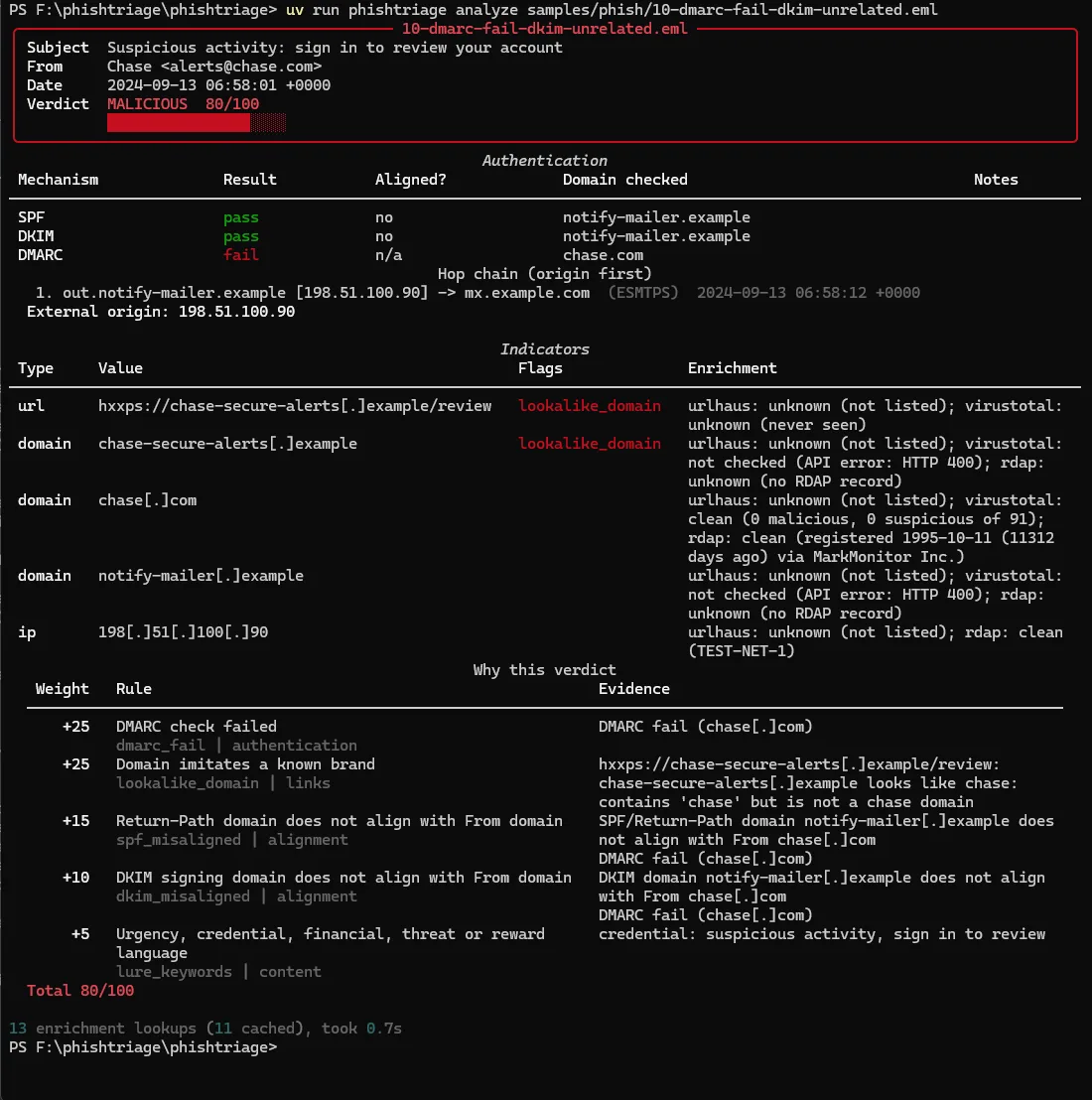
Both checks passed for notify-mailer.example. The From header says chase.com. The mail
was authenticated, just not by anyone with a claim to the name on the envelope. DMARC exists
to ask that second question, alignment, and it failed. The tool scores the DMARC failure at
25, the two misalignments at 15 and 10, the lookalike link domain at 25, and the urgency
language at 5. Every point has a line of evidence next to it.
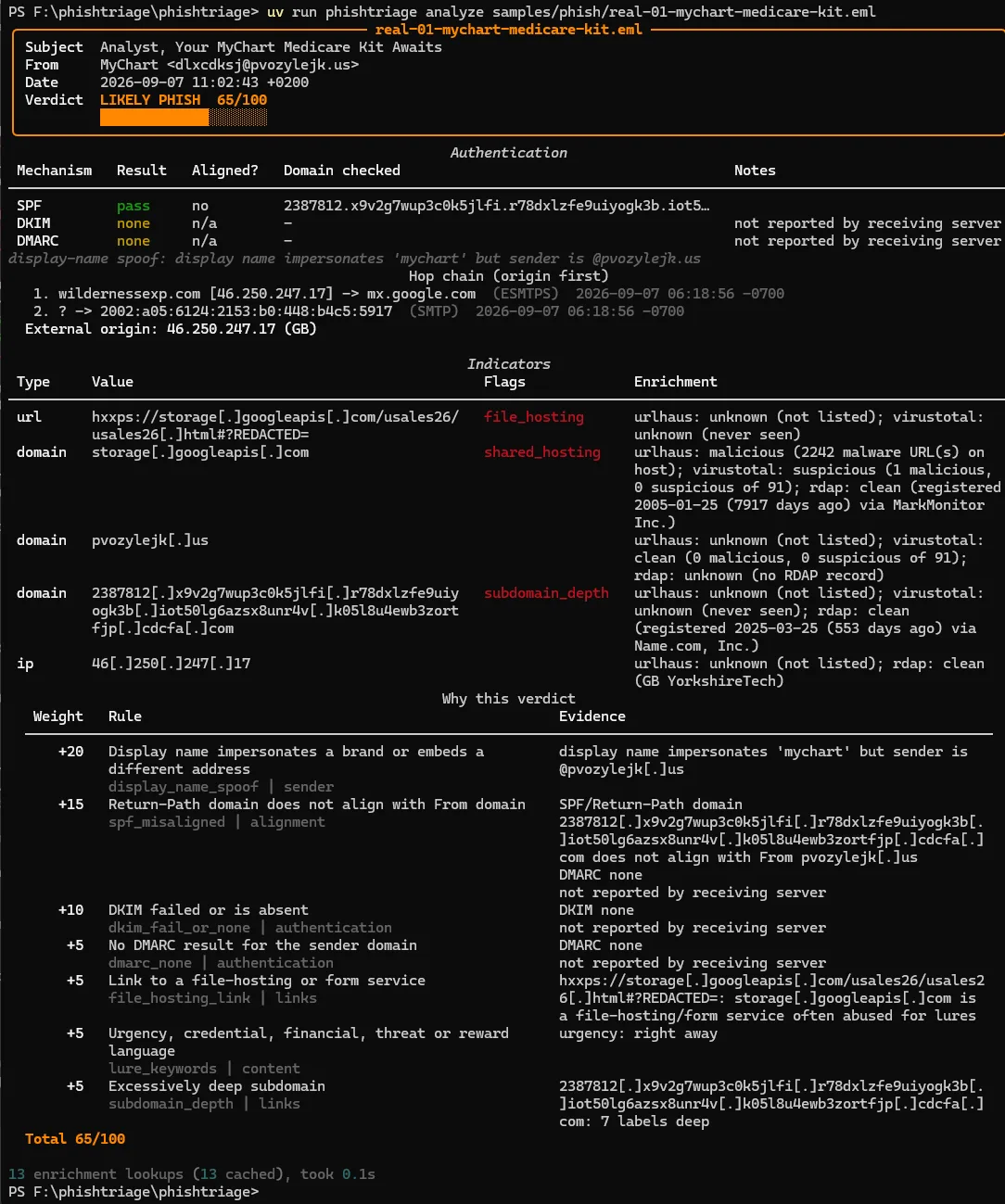
That sample is synthetic, built to isolate the case. The same shape turned up in the first real phish I fed it: a “MyChart Medicare kit” lure where SPF passed for a seven-label randomised bounce domain that had nothing to do with the sender in From.
What triage actually is
On a security team, the first pass over a reported email is a fixed checklist. Who sent it. Did the infrastructure vouch for them, and was it the right infrastructure. Where did the message physically come from, hop by hop. What does it want me to click or open. The output has to look like something you would paste into a ticket, because that is where it goes.
The checklist is also the argument for rules as data. Each check is a rule with an id, a weight, a condition and a one-sentence rationale. No machine learning, on purpose: the goal is that every point on the score can be explained by pointing at a rule.
Running my own spam folder
The synthetic corpus, 12 phish and 6 benign, scored perfectly, which is what you would expect from samples written to exercise specific rules. So I exported 15 real emails from my Gmail and university Microsoft 365 accounts, ran them through a sanitizer, and labeled them by reading them rather than by where the provider had filed them.
| File | Score | Verdict | Top rule |
|---|---|---|---|
| benign: Udemy promo | 0 | CLEAN | |
| benign: GolfNow promo | 0 | CLEAN | |
| benign: ISC2 webinar | 25 | SUSPICIOUS | link_text_mismatch |
| benign: lab results notice | 0 | CLEAN | |
| benign: domain listing | 0 | CLEAN | |
| benign: bootcamp promo | 0 | CLEAN | |
| benign: interview invitation | 0 | CLEAN | |
| benign: charity org form | 5 | CLEAN | lure_keywords |
| benign: screening assessment | 15 | CLEAN | lure_keywords |
| phish: MyChart Medicare kit | 65 | LIKELY PHISH | display_name_spoof |
| phish: job scam, admin role | 35 | SUSPICIOUS | dkim_fail_or_none |
| phish: job scam, assistant | 25 | SUSPICIOUS | dkim_fail_or_none |
| phish: credential update | 40 | SUSPICIOUS | lure_keywords |
| phish: credential update 2 | 35 | SUSPICIOUS | dkim_fail_or_none |
| phish: fake Teams interview | 5 | CLEAN | lure_keywords |
Whole corpus at threshold 50: 28 of 33 correct, 5 missed, 0 false alarms.
The misses are the finding
Four of the five misses are the same email in different clothes: job scams and credential
lures sent from compromised student accounts inside the university’s own Microsoft 365
tenant. There is no Authentication-Results header because the mail never crossed an
authenticating boundary. There is no external hop. The sender domain is genuinely the
university’s. Every infrastructure check passes because the infrastructure is clean. The
only thing wrong is the text, and text is capped at 15 points.
I could have raised the keyword weights until those four crossed 50. Then the ISC2 webinar
invitation and the charity’s application form would have followed them, and the tool would
have started doing what junk filters do. Instead the four are listed in
samples/known-misses.txt, and the regression test holds them between 20 and 49: still
flagged for a human, never silently promoted, never silently lost.
The fifth miss is worse. A fake-interview scam, “install Microsoft Teams to meet a senior
technical recruiter for an online briefing,” sent through Zoho with SPF and DKIM passing for
the scammer’s own domain. Nothing about it is structurally wrong. It scores 5. That entry
carries floor=0 in the known-misses file, because a miss that scores CLEAN is the most
useful kind to write about.
The one benign SUSPICIOUS is a real mismatch that every marketing platform produces: visible
link text says isc2.org while every href routes through Salesforce’s click tracker. A 25
reads correctly as “look, but probably fine.”
What real mail fixed
The synthetic set could not have shown any of these:
- Hop boundaries had to work in provider families, not domains. Microsoft 365 never names
the recipient’s domain in its
byhosts, and Gmail’s final hop is a bare IPv6 literal, so the boundary detector was flagging a loopback hop as a private origin on every M365 delivery and finding no origin at all on Gmail. Known providers now collapse into families, and intra-tenant mail is reported as never having left the recipient’s infrastructure. - Alignment only scores when DMARC did not pass. Tenants without custom-domain DKIM sign
with
onmicrosoft.comwhile DMARC passes on SPF. Scoring a misalignment DMARC had already accepted was double-counting. storage.googleapis.comis Google. A phishing page hosted there was being scored as a Google lookalike at 25 instead of a file-hosting link at 5. The second is right and still fires.
What I would build next
- A content category aimed specifically at job and assistant scams, still capped, because the four intra-tenant misses are the strongest argument in the corpus for one.
- A
--comparemode that diffs two rule files against the corpus, so a weight change is a reviewable diff with a before-and-after confusion matrix. - QR-code extraction from image attachments, which is now a common way to keep the URL out of the body entirely.
What happened when I turned threat intel on is its own story: Right verdict, wrong reason.